50x70 posters
Quantity: 20; Print Type: Billposting Quality; Format: 50x70; Panelization: Indifferent
The printing of 50x70 posters for bill posting covers the smallest of the formats on this page. The 50x70 cm is read at short distance: it suits notice boards, entrances, shop flyers and notices in places where a larger poster does not fit. Choose the 50x70 format in the menu, where it is listed among the classic formats, and enter the copies: from 1 to 500. The print type is bill posting quality. If you need the same artwork in a large size too, from the same configurator you can order the 70x100, the 100x140, the 140x200 and the maxi formats. The print is on wet-strength blueback paper, 115 gsm, the bill posting paper with a blue back.
Take a look at these too
50x70 posters for bill posting, the compact format
A 50x70 cm poster takes up little space and is read up close. It is the right size for the notice board of an apartment building, a school or a club, for a shop door, for a theatre entrance. Event organisers often use it alongside larger formats, with the same artwork.
Wet-strength blueback paper, 115 gsm
The print is on wet-strength blueback paper, 115 gsm, the bill posting paper with a blue back. The blue back covers the previous poster when the new one is pasted over it. Wet-strength means a paper designed for bill posting with paste, which does not fall apart when it gets wet.
The print type is bill posting quality: eco-solvent printing on this material, a substrate designed to be pasted with vinyl glue. Thanks to colours suited to outdoor exposure, the poster can be used both on indoor notice boards and in outdoor posting spaces.
Who needs 50x70 posters and where they are used
The 50x70 is the format for anyone who needs to give information to people passing a few steps away. The most common uses:
- Shops and venues: openings, special hours, evenings out, new arrivals.
- Associations, schools and parishes: courses, meetings, collections, festivals.
- Theatres, cinemas and halls: the season programme or a single show.
- Event organisers: the small version of the campaign, for outdoor posting spaces and notice boards where a larger format does not fit.
It is local communication: the reader is close, so you can afford a few more lines of text than on a roadside poster.
Configurator options explained
- Quantity: choose from 1, 10, 25, 50, 100, 250 and 500 copies.
- Print type: bill posting quality, the only value available.
- Format: select 50x70 among the classic formats (small and medium).
- Paneling: applies to posters that are printed in several pieces. You will find "Let us decide", "No preference", and splits of your choice into pieces of 100 cm and 150 cm. For a small format like the 50x70, one of the first two options is enough.
How to choose quantity and format
Start from the number of places where you want to display the poster. For a single notice board, 1 copy is enough. For the shops on one street or the notice boards of a neighbourhood, look at the 10, 25 or 50 options. For distribution across a whole town or several venues there are 100, 250 and 500 copies.
If you have not yet decided on the size, pay attention to the real space: take the dimensions of the notice board or the door before ordering. When the space is larger, you will find the other classic formats in the same menu.
Four order examples
- A music school and the end-of-year recital: one copy on the school notice board, one at the auditorium entrance and a few in nearby shops. The 10-copy option is enough and leaves a few spare.
- A parish and the patron saint festival: the notice boards of the churches, the youth centre and the hamlets, plus the village bars. With about twenty places, the 25-copy run is the one designed for local events.
- A theatre and the new season: foyer, box office, libraries and bookshops in the town centre that display the programme. When the places rise to a few dozen, look at the 50-copy option. If the programme changes mid-season, you reprint only the copies for the places to be updated.
- A chain of shops and a promotion: one poster on the door of every store and one near the till. With fifty shops you need 100 copies.
As the run increases, the unit price decreases. It is still best to start from the real display places: extra copies without a space to put them in stay in storage.
Sizes and quantities
The size is 50x70 cm and it is the smallest on the list. Going up you find 70x100, 100x140 and 140x200, then the 200x100, 300x150 and 200x200 formats, up to the maxi formats.
Copies range from 1 to 500. The configurator calculates the price based on your choices: format, quantity, options.
The 50x70 within a larger campaign
The 50x70 and the 100x140 have the same proportions: the 50x70 is exactly half on each side. If you already have the artwork for the 100x140 panels, you can derive the 50x70 file by reducing it, with no cropping and no empty bands. Do check the smaller text again: when halved, contact details and notes at the bottom of the poster can become too tiny, so it is best to enlarge them in the file of the smaller format.
The 70x100 has a slightly different ratio between width and height. If the campaign also uses that size, prepare an adapted file.
A practical way to divide the roles: the large format goes on posting spaces, the 50x70 posters go in the shops that support the initiative, on indoor notice boards and at entrances. Each format is configured separately, with its own file.
For participating shops you can prepare a small kit: a 50x70 poster for the door or the window and a few flyers to leave on the counter. Delivered together, it makes it easier to ask for space from whoever hosts the campaign, because the shopkeeper already knows where to put each sheet.
Practical tips on artwork and files
- Set up the file with the same proportions as the 50x70, so the artwork is not cropped or distorted.
- If you need to print the same campaign in several formats, prepare one file for each size instead of adapting a single one.
- Check that headlines, dates and contact details are legible and that the colours have good contrast with the background.
- Before confirming, reread the summary: format indicated, number of copies, options.
Laying out a 50x70 poster: an example
Whoever reads a 50x70 is a few steps away and stops for a few seconds. You can organise the sheet in three bands, from top to bottom:
- Title: the name of the event or the promotion, in large type, on one or two lines at most.
- Image and key information: a photo or an illustration, with date, time and place clearly legible beside it.
- Details: ticket prices, registration instructions, contact details, web address, organisers' logos. This is the part that only those who are already interested will read.
For a dance recital, for example: at the top "End-of-year recital", in the middle the photo of the students with "Saturday at 6 pm, Teatro comunale" and the date, at the bottom free admission, the school's website and the sponsors' logos.
Before ordering, do a full-size test: with your own printer, print only a piece of the file at 100%, for example the block with date and place, and hang it where the poster will go. Step back a few paces. If you have to move closer to read it, enlarge that block in the file.
Edges, margins and images in the file
The 50x70 too, like the other bill posting posters, is prepared without mandatory bleed. Background colours and decorations can touch the edge of the sheet: there is no need to shrink the artwork or frame it in white. Just consider that the final trim can remove 1-2 mm, and keep every essential text, logo or border at least 2-3 mm from the edge.
For photographs and logos use the original files, not images copied from a website or a social network, which are often too small for print. For the file requirements, see the file instructions.
From file to order
Configure the product and upload the artwork in the chosen format. Before sending the artwork, see the file instructions. The available production times are shown by the configurator; delivery also depends on the transport chosen for shipping.
Communications that change every month
Cinemas, clubs, libraries and rehearsal rooms often change the poster with every programme: the film of the month, the calendar of evenings, the meetings of the season. In these cases it is best to prepare an artwork template in 50x70 just once, with title, logo and bands always in the same position, and update only dates and content each month.
Small runs help: with the 10 or 25-copy option you print each time only the copies you need for your notice boards. The regular audience recognises the format and the artwork, and immediately finds what is new.
When you need a larger format
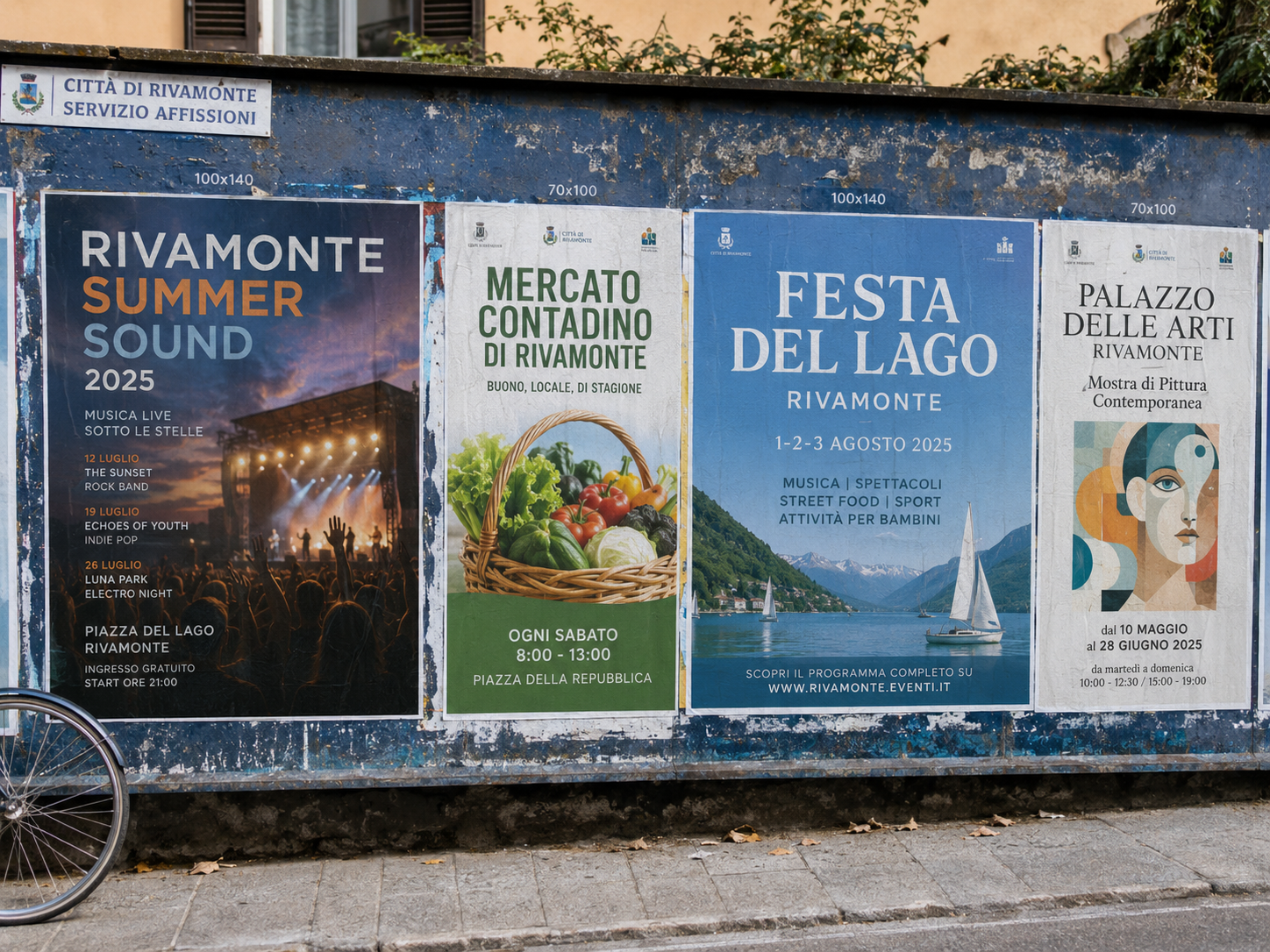
The 50x70 works as long as the reader is close. On a panel along a busy road, where people pass by car or scooter, or on a wall seen from the opposite pavement, the sheet becomes too small to be noticed. The same goes for municipal posting spaces, where your poster sits next to larger ones.
In these cases move up to the 70x100 or the 100x140, which you find among the classic formats in the same menu. Keep the 50x70 for places where people walk slowly or stop: entrances, corridors, notice boards, shops.
50x70 posters or flyers: which to choose
Posters and flyers serve different uses.
- Choose 50x70 posters when the sheet is to be pasted in a posting space, even outdoors. Wet-strength blueback paper and eco-solvent printing are designed precisely for bill posting with vinyl glue.
- Look at flyers when you need a sheet smaller than the 50x70, to keep on the counter, next to the till or on an already crowded notice board, in A3 or A4 format.
Displaying the poster on a notice board, on a door or in a window
- Notice boards with a door: measure the inside of the notice board, not the outer frame. A 50x70 must fit without bending at the corners.
- Doors and interior walls: fix the poster at the four corners, so it stays flat and does not curl.
- Shop windows: the poster faces the street, but whoever is inside the shop sees the back, which on blueback paper is blue. If the window is highly visible from the inside, take this into account when choosing the position.
- Shared notice boards: on an apartment building or neighbourhood notice board your poster sits next to many notices printed on white sheets. A solid coloured background makes it stand out at a glance.
- Posting spaces: here the poster is pasted, and the blue back covers what was there before.
Frequently asked questions about 50x70 posters
Is the 50x70 the smallest format I can order here?
Yes, among the available formats it is the smallest. For smaller sizes there are A3 and A4 flyers.
Can I order just 10 posters?
Yes, 10 copies is one of the available quantities. You can also order just one.
Can I have the same artwork in 50x70 and in 70x100?
Yes, both formats are in the menu. Configure one format at a time and prepare one file for each size.
What should I enter under paneling?
Paneling applies to posters divided into several pieces. For the 50x70 you can leave "Let us decide" or "No preference".
Can I choose a different print type?
The print is in bill posting quality. Photographic quality can be found on the poster product pages.
What is the maximum number of copies I can order?
The highest quantity on the list is 500 copies. The intermediate options are 25, 50, 100 and 250.
Is the poster customised with my artwork?
Yes. We print the file you upload after configuring format and quantity.
Do I need to request a quote for 50x70 posters?
No. It is an online printing service: the price is calculated by the configurator based on format, quantity and options, without a specific request.
Can I derive the 50x70 file from the artwork of the 100x140 posters?
Yes. The two formats have the same proportions and the 50x70 is half on each side: reduce the artwork and save it as a separate file. Just check that the smaller text remains legible after the reduction.
Do I need to leave bleed on 50x70 posters?
No: the rule for bill posting posters applies, with no mandatory bleed. It is enough that text and logo stay at least 2-3 mm from the edge.
Is the blue back visible in a shop window?
Yes, from inside the shop. The blue back is the feature of blueback paper, which serves to cover previous posters in posting spaces.
Related products
For even smaller formats look at the A3 flyers and the A4 flyers. The next step up in size is the 70x100 posters, followed by the 100x140 posters. For photos and artwork in photographic quality there are the Custom posters. You can find everything in Advertising posters.
If the campaign needs larger panels, besides the 70x100 and 100x140 posters there are the 140x200 posters for vertical spaces and the 6x3 posters for roadside billboards. To bring the same message moving through the city streets, look at the Truck with sail: advertising posters.
If instead the subject is one of your own photographs, to be hung rather than bill posted, there is the Custom photo poster with your photos. The complete collection of posters, prints and flyers is in Posters, prints and flyers.
Dall’idea al file pronto per la stampa
Con il servizio di progettazione grafica puoi creare una nuova composizione, vettorializzare un logo o adattare immagini e impaginazione al prodotto scelto. Condividi materiali e indicazioni in chat e rivedi le anteprime prima della preparazione dei file finali.
Scopri il servizio di progettazione grafica
Il servizio grafico è incluso nel prezzo di stampa?
La progettazione grafica è un servizio a pagamento, acquistabile separatamente. Il controllo del file di stampa rimane compreso nel prezzo del prodotto; per creare o modificare la grafica puoi acquistare il servizio dedicato.
Total: 19,73 € (VAT included)